RC Car Won't Start - Complete Diagnosis Guide
Is your RC car completely dead, won't turn on, or has no power? This step-by-step troubleshooting guide will help you diagnose and fix the most common issues that prevent RC cars from starting.
Quick Answer: Most RC cars that won't start have dead batteries, loose connections, or binding issues. Check your battery first, then verify the radio control system is properly bound, and finally inspect for damaged wires or components.
Understanding Your RC Car's Components
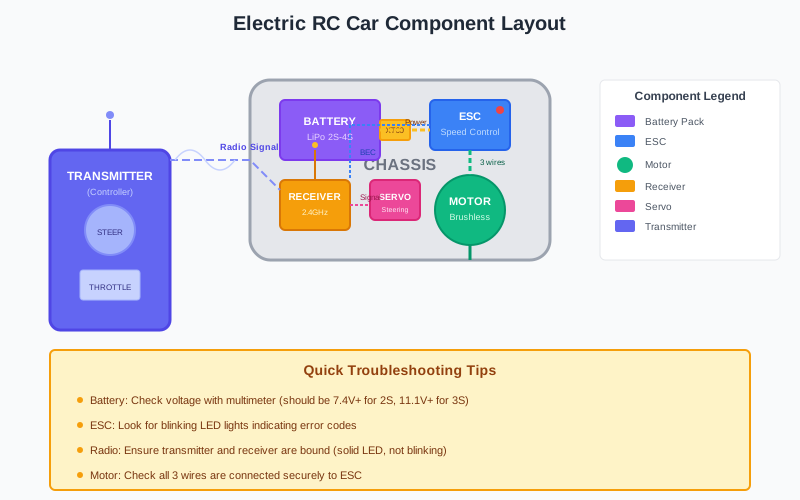
Quick Diagnosis Checklist
Complete Diagnosis Flowchart
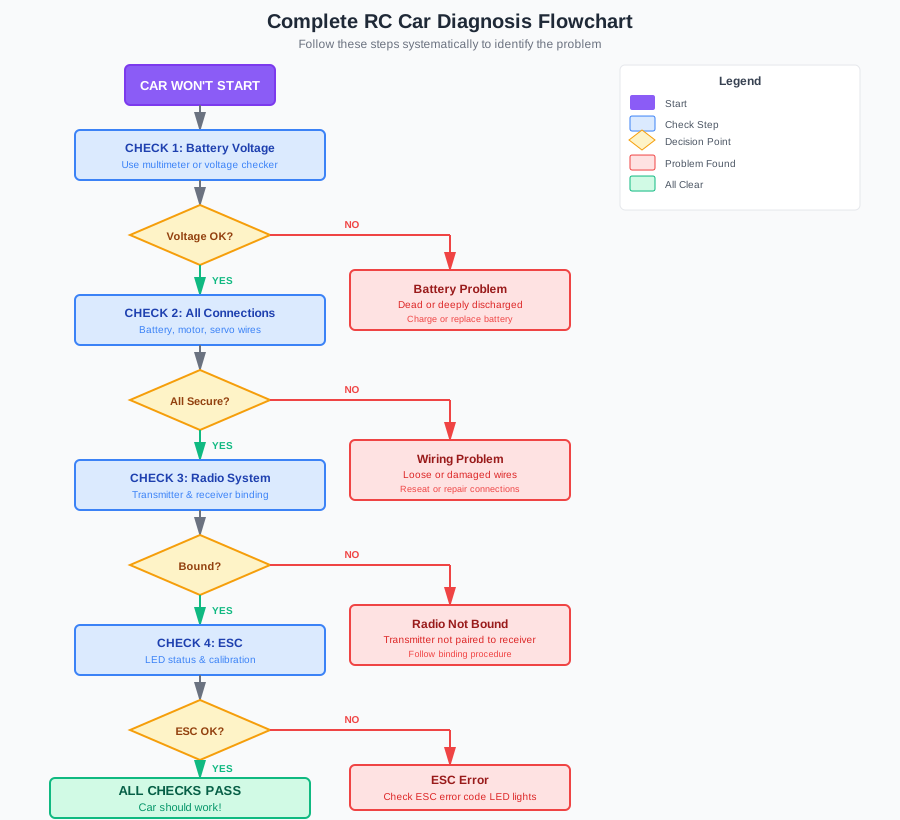
Power System Issues
Radio Control Issues
Before You Begin: Safety First
Important Safety Precautions
- Remove the battery before working on electrical components
- Work in a well-lit area with good ventilation
- Keep water away from electronics (unless waterproof)
- Have a fire extinguisher nearby when working with LiPo batteries
When your RC car is completely dead and won't respond, it's easy to panic. But most issues have simple solutions. This guide will walk you through a systematic approach to diagnose why your RC car won't start, whether it's a battery problem, ESC issue, or radio control failure.
Step 1: Check the Battery System
Most Common Cause: Battery Issues
80% of "RC car won't start" problems are battery-related. Start here before anything else.
Battery Voltage Reference Guide
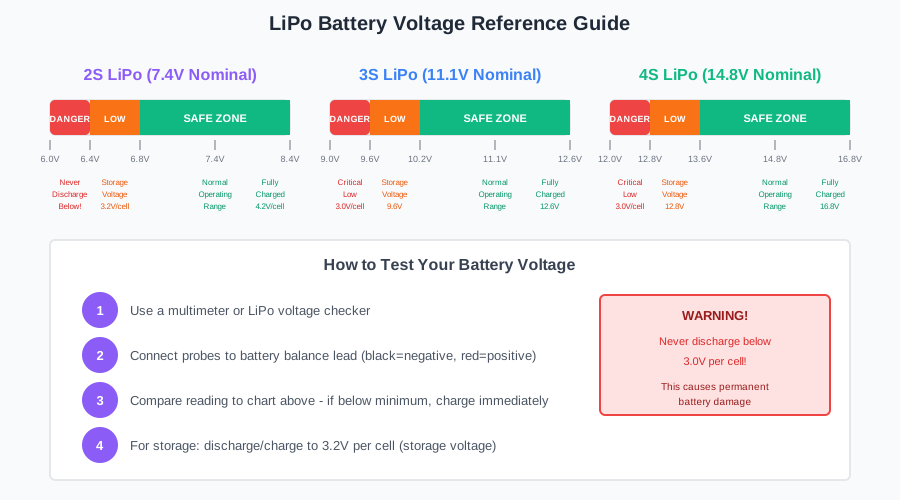
1.1 Battery Voltage Check
A dead or undercharged battery is the #1 reason RC cars won't turn on or have no power.
LiPo Battery Voltage Guide:
- 2S LiPo: 7.4V nominal (6.8V minimum, 8.4V fully charged)
- 3S LiPo: 11.1V nominal (10.2V minimum, 12.6V fully charged)
- 4S LiPo: 14.8V nominal (13.6V minimum, 16.8V fully charged)
If voltage is below minimum, the battery is dead and needs charging or replacement.
1.2 Battery Charger Issues
Sometimes the battery isn't the problem - the charger is.
Charger Troubleshooting:
- Check if charger is plugged in and powered on
- Verify correct battery type selection (LiPo vs NiMH)
- Ensure balance port is connected for LiPo batteries
- Look for error messages on charger display
- Try charging a different battery to test the charger
1.3 Battery Connector Issues
Loose or damaged battery connectors can cause intermittent power or complete failure.
Common Connector Problems:
- Deans/T-Plug: Check for melted plastic or loose fit
- EC5/EC3: Ensure bullet connectors are clean and tight
- Banana Plugs: Look for corrosion or bent pins
- XT60: Check for cracked housing or poor contact
Clean contacts with electrical contact cleaner and ensure a snug connection.
Step 2: Check the Radio Control System
Radio Control Problems
If your RC car has power but won't respond to controls, the issue is likely in the radio system.
2.1 Transmitter (Controller) Issues
Transmitter Troubleshooting:
- Dead Batteries: Replace AA batteries in transmitter
- Power Switch: Ensure transmitter is turned on
- Antenna: Check if antenna is extended and not damaged
- Throttle Trim: Make sure throttle trim is centered
- Binding Mode: Accidentally entered binding mode
2.2 Binding Issues
Binding pairs your transmitter with the receiver. If they lose binding, the car won't respond.
Step-by-Step Binding Process
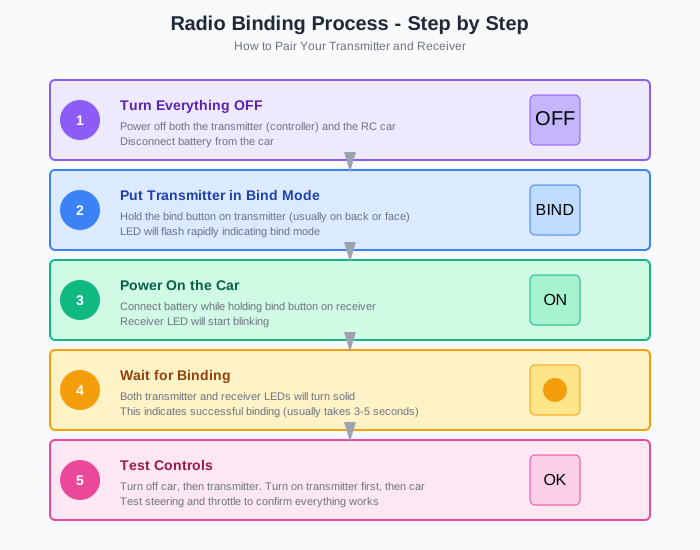
How to Rebind Most RC Systems:
- Turn off both transmitter and car
- Put transmitter into bind mode (usually holding a button)
- Power on the car while pressing bind button on receiver
- Wait for solid light indicating successful binding
- Test controls to verify connection
Consult your manual for specific binding procedures - different brands vary.
2.3 Receiver Problems
The receiver can fail or lose power, causing no response.
Receiver Troubleshooting:
- Check receiver LED status (should be solid, not blinking)
- Verify receiver is getting power from ESC BEC
- Look for damaged antenna wire
- Check for loose servo/ESC connections
- Test with a different receiver if available
Step 3: Check the ESC and Motor
ESC and Motor Issues
If battery and radio check out, the ESC (Electronic Speed Controller) or motor may be the culprit.
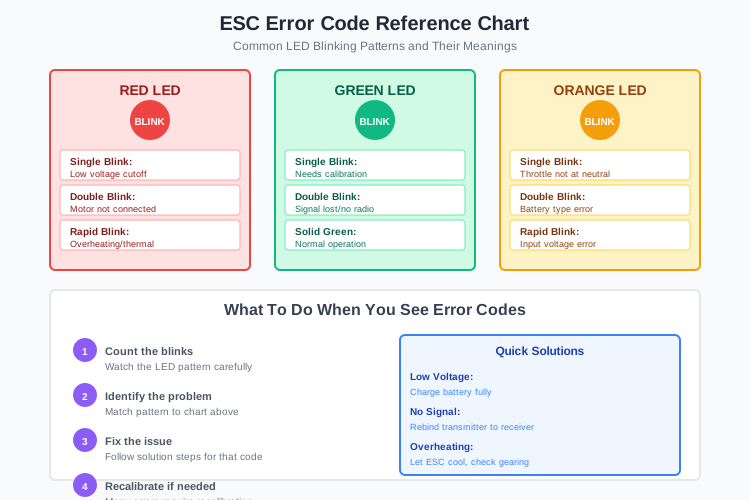
ESC Error Code Reference Chart
3.1 ESC Troubleshooting
An uncalibrated ESC won't respond to throttle inputs properly.
ESC Calibration Steps:
- Turn on transmitter with throttle at neutral
- Connect battery while holding ESC calibration button
- Wait for calibration sequence (usually beeps/LEDs)
- Apply full throttle when prompted
- Apply full brake when prompted
- Return to neutral to complete calibration
3.2 ESC Error Codes
Blinking LEDs on your ESC indicate specific problems.
Common ESC Error Patterns:
- Red Blinking: Low voltage cutoff or thermal protection
- Green Blinking: Calibration needed or signal lost
- Double Blink: Motor not detected or disconnected
- Rapid Blinking: Overheating or short circuit
Consult your ESC manual for specific error code meanings.
3.3 Motor Issues
Motor problems can prevent the car from moving even if electronics work.
Motor Troubleshooting:
- Brushed Motor: Check for worn brushes or commutator damage
- Brushless Motor: Look for damaged sensor wires or hall sensors
- Motor Connections: Verify all three motor wires are secure
- Gear Mesh: Ensure pinion and spur gears mesh properly
- Physical Damage: Look for bent shafts or damaged bearings
Step 4: Issues After a Crash
If your RC car was working fine before a crash, check these crash-related issues:
Post-Crash Inspection Checklist
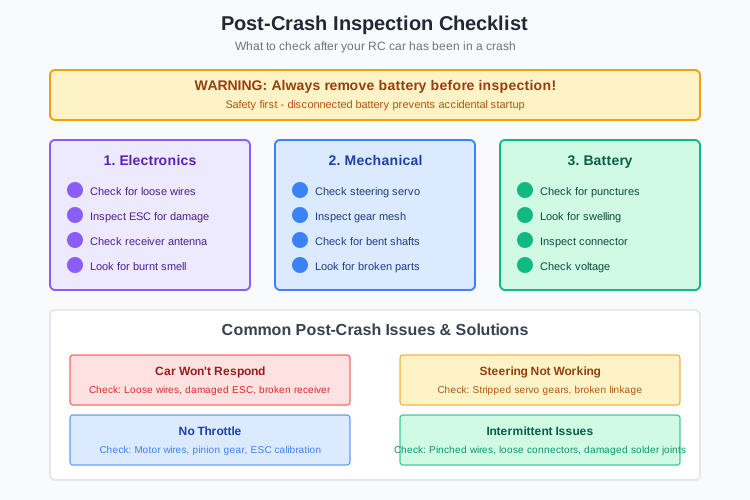
Post-Crash Troubleshooting:
- Broken Wires: Check for severed or pinched wires
- Connector Damage: Look for broken battery or motor connectors
- ESC Damage: Check for cracked ESC case or burnt smell
- Servo Damage: Test steering servo for stripped gears
- Chassis Damage: Ensure nothing is shorting against electronics
Advanced Troubleshooting Techniques
6.1 Using a Multimeter
A multimeter can help diagnose electrical issues quickly.
Multimeter Tests:
- Voltage Test: Check battery voltage under load
- Continuity Test: Check for broken wires or bad connections
- Resistance Test: Check motor windings for shorts
- Current Draw: Test for excessive current consumption
6.2 Component Swapping
If you have spare parts, swapping is the fastest way to isolate problems.
Swapping Priority Order:
- 1. Try a different battery (most common issue)
- 2. Try a different transmitter (radio problems)
- 3. Try a different ESC (power delivery)
- 4. Try a different motor (drive system)
- 5. Try a different receiver (signal processing)
Frequently Asked Questions
Why won't my RC car turn on even with a fully charged battery?
Check the power switch, battery connections, and main power wire. Also verify the ESC is getting power (look for status LED).
My RC car has power but won't move. What's wrong?
This usually indicates ESC calibration, motor connection, or gear mesh issues. Check that the ESC is calibrated and motor wires are secure.
Why does my RC car work for a few minutes then stop?
This often indicates low battery capacity, thermal protection, or voltage cutoff. Check battery health and ESC temperature.
How do I know if my ESC is bad?
Signs of a bad ESC include no power to receiver, blinking error codes, burning smell, or no response to throttle even after calibration.
Can water damage cause my RC car to not start?
Yes, water can short circuit electronics. Dry everything thoroughly and check for corrosion on connections. Some components may need replacement.
Preventing Future "Won't Start" Issues
Maintenance Tips:
- Battery Care: Store LiPo batteries at 50% charge in a cool, dry place
- Regular Inspections: Check for loose wires before each run
- Clean Connections: Keep battery connectors clean and free of corrosion
- Proper Storage: Remove batteries when not using for extended periods
- Water Protection: Use waterproof electronics or avoid wet conditions
Helpful Tools for Troubleshooting
Essential Tools
- Digital multimeter
- Soldering iron
- Electrical contact cleaner
- Small screwdrivers and hex drivers
- Needle-nose pliers
Diagnostic Tools
- Battery voltage checker
- ESC programming card
- Servo tester
- Motor tester
- Thermal temperature gun